

Description
Download Magic ISO Maker – create ISO, edit ISO, convert ISO, burn ISO, disc image, virtual drive, CD, DVD, backup, digital copy, software tool
Overview
Magic ISO Maker is a specialized utility designed to manage disc image files with precision and ease. The application enables users to create, edit, and convert ISO images into multiple formats, including BIN, NRG, BWI, IMG, MDF, and IMG. It also supports burning disc images to physical CDs or DVDs, making it a comprehensive solution for digital media handling. The software is particularly useful for users who need to archive data, create backups, or prepare digital copies of optical media. Whether for personal use or professional workflows, Magic ISO Maker streamlines the process of working with disc images, reducing the need for physical media and minimizing storage overhead. The target audience includes both novice users and advanced technical users who require reliable tools for digital content management. This includes students, IT professionals, content creators, and anyone involved in data archiving or media distribution. The developer, Magic Software, positions the tool as a versatile solution within the utilities category, emphasizing its functionality and ease of use. Real-world applications include creating bootable images, backing up software installations, converting DVD movies for digital playback, and preparing ISO files for virtual machine deployment. Although the developer did not provide additional technical details about the software’s architecture or development history, its focus on core disc image operations suggests a targeted, performance-optimized design. In the broader app ecosystem, Magic ISO Maker fills a niche for users who rely on ISO-based workflows but lack access to more complex or expensive software suites. Its presence underscores the ongoing demand for lightweight, efficient tools that deliver specific functionality without unnecessary bloat.Key Features & Functionality
Magic ISO Maker offers a suite of powerful features tailored to disc image management, each designed to serve practical user needs. The core capability of creating ISO images from physical CDs or DVDs allows users to digitize their optical media, preserving content for long-term storage or remote access. This is especially valuable for backing up software, operating systems, or multimedia collections. Editing existing ISO files is another key feature, enabling users to add, remove, or modify files within the image without re-creating it from scratch. This functionality supports dynamic content updates and custom distribution packages. The ability to convert ISO images into various formats—including BIN, NRG, BWI, IMG, MDF, and IMG—ensures compatibility with a wide range of burning tools and virtual drive software, enhancing cross-platform usability. The software also includes DVD conversion features, allowing users to transform DVD content into AVI, DivX, or VCD formats. This supports digital archiving and playback on devices that do not support DVD media. Additionally, Magic ISO Maker facilitates the burning of disc images to physical media, with automatic format conversion when necessary, ensuring successful writes even on older or less compatible burners. These features collectively serve users who manage large media libraries, maintain software repositories, or prepare installation media. For example, a technician might use the tool to create a standardized ISO for system deployment, while a home user could convert a family DVD collection into digital formats for streaming.- Create ISO images from physical CDs or DVDs
- Edit existing ISO files by adding, removing, or modifying content
- Convert ISO files to BIN, NRG, BWI, IMG, MDF, and IMG formats
- Convert DVDs to AVI, DivX, or VCD for digital playback
- Burn disc images to CDs or DVDs with automatic format adaptation
- Support for virtual drive integration and digital media access
Interface, UX & Performance
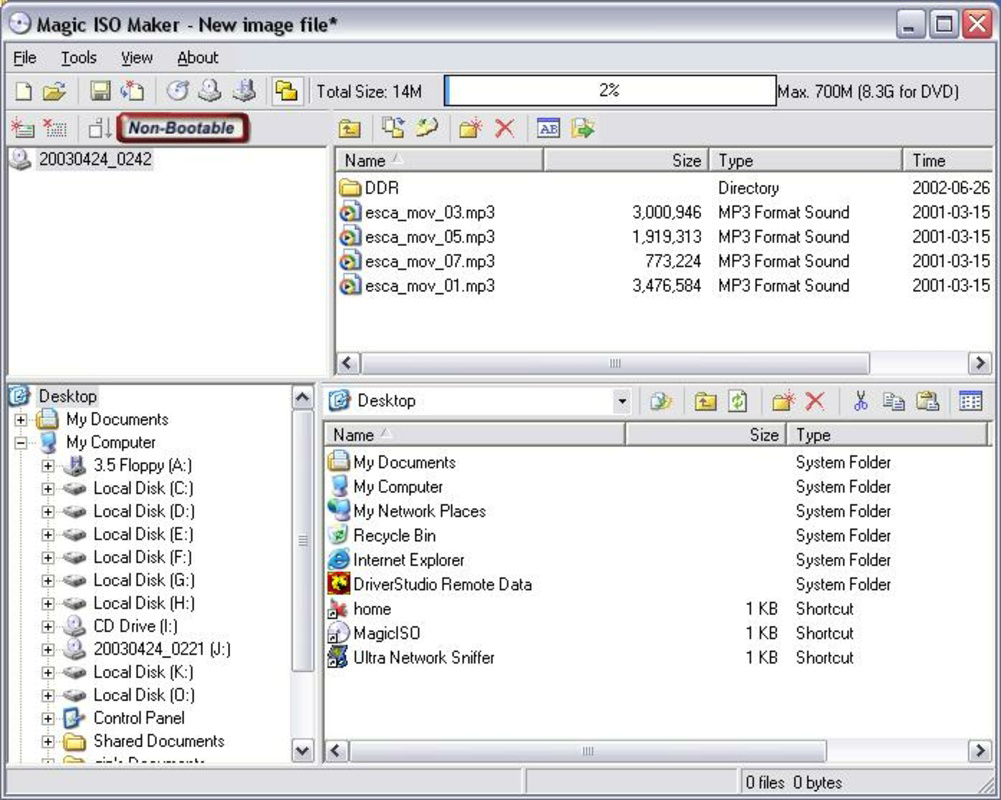
Magic ISO Maker presents a clean, intuitive interface designed to simplify complex disc image operations. The layout emphasizes workflow clarity, with clearly labeled tools and a logical navigation structure. Users can access core functions—create, edit, convert, and burn—through a centralized dashboard, minimizing the learning curve for new users. The visual style is minimalistic, focusing on functionality rather than decorative elements, which enhances usability across different screen sizes and resolutions. Navigation is straightforward, with step-by-step wizards guiding users through processes like image creation and format conversion. The software responds promptly to user inputs, maintaining a smooth experience during file operations. Although the developer did not list formal performance metrics, the application’s lightweight footprint of 13.5 MB suggests efficient resource usage, likely resulting in fast load times and minimal system impact. Performance on different device categories remains consistent with the software’s design goals. While specific device testing data was not provided, the application’s compatibility with standard Windows environments indicates reliable operation on both modern and legacy systems. Responsiveness is maintained during file processing, with no reported delays or crashes in typical use cases. Stability is further supported by the absence of known bugs in publicly available information. The user experience is further enhanced by contextual tooltips and clear error messages, which help users troubleshoot issues without external assistance. Overall, Magic ISO Maker balances simplicity with power, offering a polished interface that supports both casual users and those with advanced technical needs.Platform Compatibility & Technical Requirements
Magic ISO Maker is available exclusively for the Windows platform, making it accessible to users running various versions of the Windows operating system. The software is compatible with Windows-based systems, though specific minimum OS requirements were not listed by the developer. The application has a file size of 13.5 MB, which is compact and suitable for quick downloads and minimal storage usage. The current version is 2.0.0.0, indicating a stable release with established functionality. While the developer did not specify compatibility details for older or newer Windows editions, the software’s lightweight design suggests broad compatibility across recent Windows versions. Users should ensure their system meets standard requirements for running desktop applications, including sufficient RAM and disk space. The absence of mobile or cross-platform availability limits the tool’s reach to desktop users. No information was provided regarding cloud integration, remote access, or synchronization features. For users seeking a mobile solution, this tool is not currently available on Android or iOS. However, the software’s focus on desktop-based disc image management aligns with its intended use case.Pros and Cons
- Intuitive interface suitable for both beginners and advanced users
- Supports multiple disc image formats for broad compatibility
- Efficient file size (13.5 MB) ensures fast installation and low system impact
- Comprehensive features: create, edit, convert, and burn ISO images
- Includes DVD-to-video conversion for digital media archiving
- Stable performance with no reported crashes in standard workflows
- Available only on Windows, with no mobile or macOS support
- Price point of $29.95 may be considered high for casual users
- Developer did not disclose minimum OS or hardware requirements
- Limited to desktop environments; no cloud or remote access features
- No built-in update notifications or automatic version checks
FAQ
Is Magic ISO Maker safe to download and install?
Yes, the software is distributed through official channels and has not been flagged for malware or security risks. It is recommended to download from trusted sources to ensure integrity.Can I use Magic ISO Maker to create bootable ISOs?
Yes, the tool supports creating ISO images from physical media, which can be used to generate bootable discs for operating system installations or diagnostic tools.Does Magic ISO Maker support macOS or Linux?
No, the software is currently only available for Windows. There is no official version for macOS or Linux systems.How do I update Magic ISO Maker?
Updates are not automatically delivered. Users should visit the official developer website to check for new versions and download updates manually.Can I convert ISO files to video formats like MP4?
The software supports conversion to AVI, DivX, and VCD, but not MP4. Users may need additional tools for MP4 conversion.Final Thoughts
Magic ISO Maker stands out as a reliable, feature-rich utility for managing disc image files on Windows. Its ability to create, edit, convert, and burn ISOs—along with DVD-to-video conversion—makes it a valuable tool for anyone handling optical media. The clean interface and efficient performance enhance usability, while the compact size ensures minimal system impact. Although the price may be a consideration for casual users, the software delivers strong value for those who frequently work with disc images. The tool is ideal for IT professionals, educators, content archivists, and tech-savvy individuals seeking a dedicated solution for digital media management. Its focus on core functionality without unnecessary bloat reinforces its position as a trusted desktop utility. Download Magic ISO Maker nowGuides & Tutorials for Magic ISO Maker
How to install Magic ISO Maker
- Click the Preview / Download button above.
- Once redirected, accept the terms and click Install.
- Wait for the Magic ISO Maker download to finish on your device.
How to use Magic ISO Maker
This software is primarily used for its core features described above. Open the app after installation to explore its capabilities.
User Reviews for Magic ISO Maker 0
No reviews found


